
Every retail operation expereinces loss or shrinkage. The FoodSpot system was designed to help you prevent and address loss.
Sometimes, dishonest customers may unlock the fridge, remove a sticker from a food item, and take the item to avoid being charged. Below are the best practices you can implement to prevent theft at your microstore.
- Use the correct RFID stickers. You may be considering using the smaller metal packaging RFID sticker for most products due to it's smaller size. As much as possible, use the square plastic packaging or microwaveable sticker as these are much harder to remove as they are fully adhesive. Only use the metal packaging stickers for drinks and metal packaged-products.
- Hide the RFID stickers. If possible, cover the RFID sticker with your own label, making it difficult to remove. Our FDA-approved smart stickers can also be applied inside the packaging. Test the readability with one or two products before going this route.
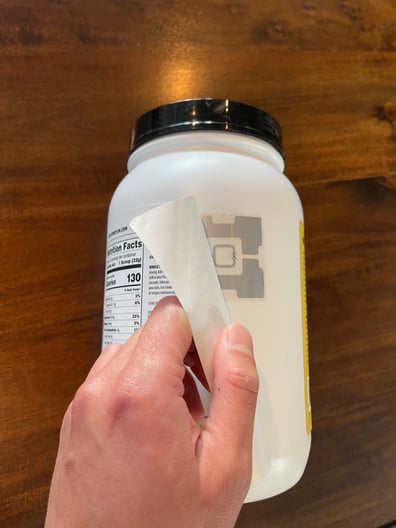
- Immediately remove loose stickers in the fridge and note the time and date. This makes it easier to identify shoplifters and not cue others to remove stickers.
- Apply signage reminding customers that theft will be prosecuted.
- If you have the BA 1 model (with a security camera), use signage to draw attention to the security camera, reminding customers they are being recorded.
Addressing Theft:
When shoplifting does occur, our platform makes it easy to find the culprit.
- In your dashboard, click on the Transaction tab to see all transaction data.
- Make sure the “Hide NIL Type” is switched off at the top of the screen. NIL transactions are those transactions where the fridge was unlocked, but no purchase was made. This is your short list of suspects.

- Search for NIL transactions during the time you suspect the theft was committed. NIL transactions are indicated in the first column:

- When you have identified possible suspect NIL transactions, it's time to review footage based on your microstore model:”
If you have a BA1 model (with a security camera):
-
- Go to Camera > Playback
- From the dropdown, select the microstore at which the theft occured
- Select the recording that contains the date and time of the NIL transaction you suspect is the instance of theft.
- Watch and download the footage.
If you have a DC8 model (withOUT security camera):
-
- Consider placing your microstores in a location with existing security cameras or installing security cameras nearby.
- If there are existing security cameras, request footage from your security team during the dates and times of the suspect NIL transactions.
5. Submit this footage, along with the suspected customer and transaction data, to law enforcement. Once theft is addressed, it typically decreases.
Key words:
there are loose stickers in my microstorecustomers are stealing
customers are removing stickers
items missing from fridge
suspected theft
nil transactions theft